
TikTok trend · 15 s
Dame Hombro AI
Upload your photo and dance the trend. Solo or with a partner.
Your Dame Hombro video
Dame Hombro AI turns your photo into a Dame Hombro trend video: upload 1 photo (Solo) or 2 (With a partner) and in about 5 minutes you get a 15-second vertical 9:16 MP4, with no watermark and no sound, wearing your own face and outfit. You need an account with your email to generate; there are no free videos and the first one is $7.99.
Dame Hombro AI Editorial Team · Updated
The basics
- Price
- $9.90 a video; the first one is $7.99. Packs of 5 ($29.90) and 10 ($34.90).
- Free videos
- None. If a video fails, the credits come back automatically.
- Account
- Sign up with your email to generate. Watching the samples needs no account.
- Format
- Vertical 9:16 MP4, 15 seconds, no watermark, no sound.
- Time
- About 5 minutes a video.
- Your photos
- Deleted within 7 days and never used to train models.
How it looks
Your photo goes in. You dance.



How it works
Three steps. Zero editing.
- 1
Upload your photo
One for Solo, two for With a partner.
- 2
Tap Generate
You see the price first. About 5 minutes.
- 3
Add the sound
Download and add the audio in TikTok.
What is Dame Hombro?
The shoulder dance everyone is copying
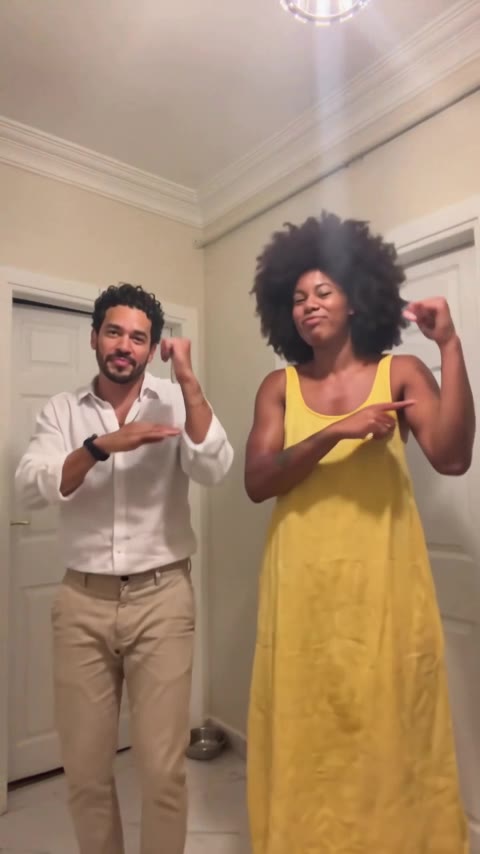
Dame Hombro is a TikTok dance trend: a short routine with a bounce, a shoulder shake, an arm flex, heart hands and a lean toward the camera. This tool puts you in that dance, move for move.
Where it comes from and how it goes
"Dame hombro" is a line from a dembow song by Dominican artist Bulin 47; it roughly means "give me your shoulder". When the song took off, TikTok settled on a fixed routine that people repeat alone or with two or three friends in a row.
The sequence barely changes: bounce to the beat, shake the shoulders, flex an arm, make a heart with your hands and end by leaning into the camera. That is why it works so well with AI: the dance is already set, only the dancer changes.
Our sample videos are danced by AI-generated people, not the original creators. Your video follows the same dance, with the sample's camera and room, and with your face, hair and outfit.
What makes the trend funny is the contrast: people of every age, couples, grandparents or coworkers, doing the same moves with a completely straight face. On TikTok you will find it under the #damehombro tag, almost always with the song's original sound.
With AI you do not have to learn the routine or film yourself: the tool takes a sample video with the whole dance and puts the person from your photo in it. The result is a new video, not a filter over your camera.
Sources: The #damehombro tag on TikTok · Search interest in "dame hombro" on Google Trends
Styles
Solo or with a partner
Two styles, the same dance: Solo for one person and With a partner for two, side by side. Open each one to see how it works.
How Solo works
You upload a photo of one person. In the sample video a man dances alone in his living room: the bounce, the shoulder shake, the arm flex, heart hands and a last step toward the camera.
The AI replaces that man with the person in your photo in every frame. Your face, hair, skin tone and outfit come from the photo; the dance, camera and room come from the sample. If you wear glasses or a cap in the photo, they show up too.
How With a partner works
You upload two photos, one per person. In the sample video two people dance side by side and in sync: they start side-on and end facing the camera.
Photo 1 takes the place of the dancer on the left and photo 2 the dancer on the right. Each person keeps their own face, hair and outfit. It works with your partner, a friend, your mom or a coworker, as long as they agree.
Your photo
Tips for a good result
The photo decides how the video turns out: front-facing, good light, one person.
Tips for a good result
- Full body or waist up, so the AI sees your whole outfit and copies it into the video.
- Look at the camera with your face clear. Sunglasses, masks or hair over the face confuse the AI.
- Daylight or a well-lit room. Dark or backlit photos lose detail in the face.
- One person per photo. If someone else is in it, crop the photo before uploading.
- A photo someone else took works better than a selfie: with an arm stretched out, the AI sometimes puts a phone in your hand.
- If the clothes in the photo are very thin or see-through, the video turns them into thicker fabric.
FAQ
Before you start
How do I do the Dame Hombro trend with AI?
Pick Solo or With a partner, upload a photo of each person and tap Generate. In about 5 minutes you get a 15-second vertical MP4 that follows the dance move for move. Then open it in TikTok, add the original Dame Hombro sound and post it.
Is Dame Hombro AI free?
There are no free videos. You pay per video: $9.90 for 1, $29.90 for 5 or $34.90 for 10, one-time, no subscription. If your account has never paid, the first video is $7.99. Watching the samples and templates costs nothing and needs no account.
Can I make it with my partner or a friend?
Yes, with With a partner. Upload two photos: photo 1 dances on the left and photo 2 on the right, and each person keeps their own face and outfit. Only use photos of people who agreed to it; no celebrities or minors.
Will I be wearing my own clothes?
Yes. Face, hair and outfit come from your photo; the dance, camera and room come from the sample video. For a different look, upload a photo in that outfit. Very thin or see-through clothes turn into thicker fabric.
Do I need an account?
Yes, generating needs an account with your email; it takes a few seconds. That is where your credits and videos are kept, under My videos. You can watch the samples, templates and prices without signing up.
More questions
What format is the video?
A vertical 9:16 MP4, 15 seconds long, with no watermark and no sound. It is the format TikTok, Instagram Reels and YouTube Shorts use, so you upload it as it is and add the sound there.
What kind of photo works best?
A front-facing photo with good light and one person in it, full body or waist up. Avoid sunglasses, covered faces and very dark photos. A photo someone else took usually works better than a selfie.
Does the video include the song?
No. It comes without sound so you can post it anywhere. Add the original Dame Hombro sound in TikTok or CapCut, the way everyone in the trend does; that also lets you pick the part of the song you like.
How long does it take?
About 5 minutes. You can keep the tab open or close it: we email you when it is ready and the video stays in My videos to download whenever you like.
What happens to my photos?
They are only used to make your video and are deleted within 7 days. They are not used to train models and are never shown anywhere. To delete your account, email support@damehombroai.org.
What if the video fails?
If a generation fails, the credits go back to your account automatically and you can try again. If you do not like the result, try a clearer, front-facing photo with good light.